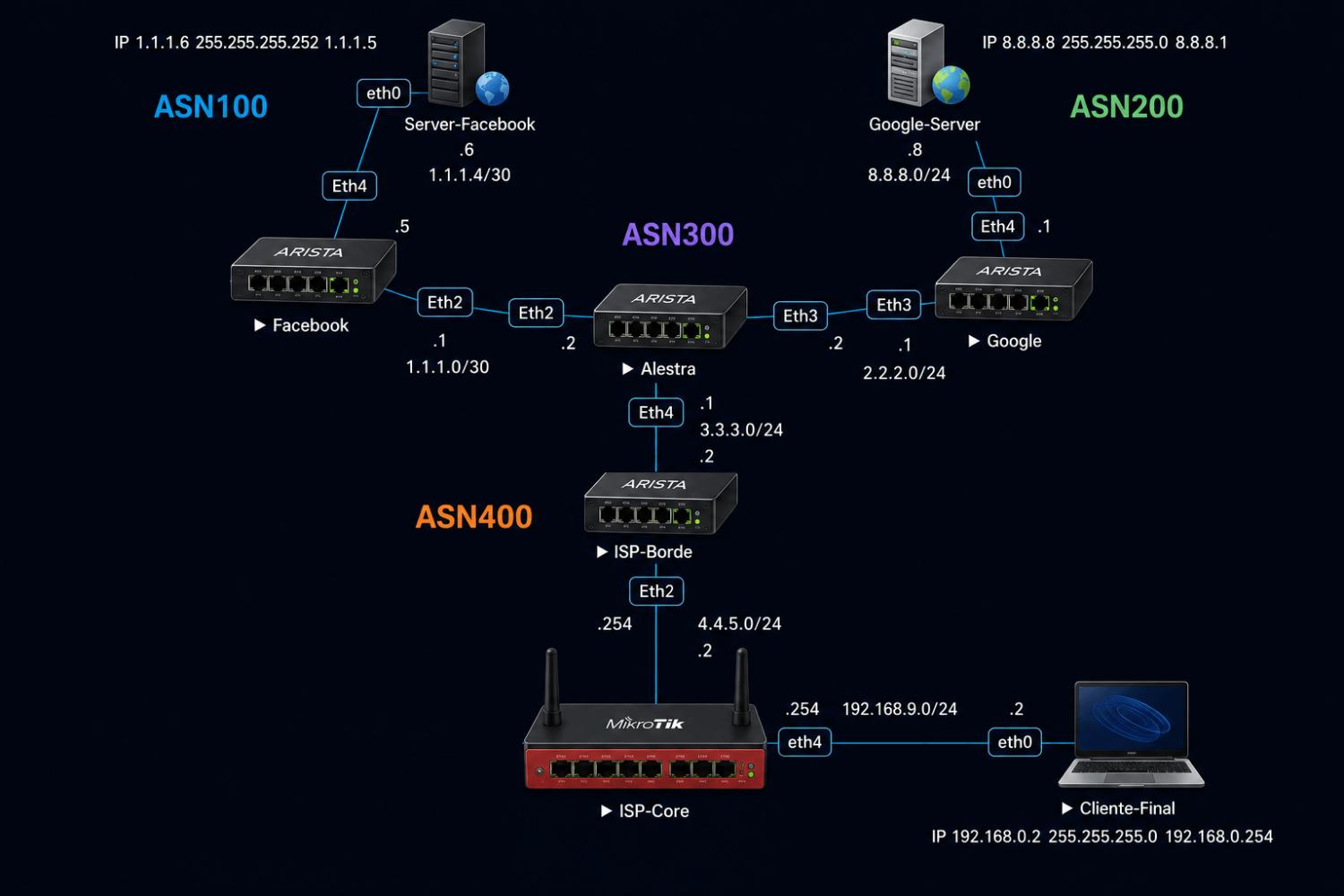
Configuración de router Facebook
Este router se usa para simular comunicación hacia Facebook. Como el router tiene su propio ASN esta publicando el prefijo 1.1.1.0/24 y 1.1.1.4/30 mediante BGP.
1 Configurar nombre al router y activar ip routing.
localhost>en

localhost#conf t

localhost(config)#hostname Facebook

Facebook(config)# ip routing
2 Configurar direccionamiento en las interfaces.
Este equipo tiene dos enlaces, uno hacia el router de Alestra y otro hacia un servidor que es a donde deben conectarse los clientes de la red ISP.
Facebook(config)# interface Ethernet2

Facebook(config-if-Et2)# no shutdown

Facebook(config-if-Et2)# no switchport

Facebook(config-if-Et2)# ip address 1.1.1.1/30

Facebook(config-if-Et2)# exit

Facebook(config)# interface Ethernet4

Facebook(config-if-Et4)# no shutdown

Facebook(config-if-Et4)# no switchport

Facebook(config-if-Et4)# ip address 1.1.1.5/30
3 Anuncio de rutas mediante BGP
Agregamos el ASN dentro de la interfaz de BGP, agregamos la red para que BGP se encargue de publicarlas a los demás peer y establecemos el peer con nuestro vecino.
Facebook(config)# router bgp 100

Facebook(config-router-bgp)# router-id 1.1.1.1

Facebook(config-router-bgp)# neighbor 1.1.1.2 remote-as 300

Facebook(config-router-bgp)# neighbor 1.1.1.2 maximum-routes 12000

Facebook(config-router-bgp)# address-family ipv4

Facebook(config-router-bgp-af)# neighbor 1.1.1.2 activate

Facebook(config-router-bgp-af)# network 1.1.1.4/30

Facebook(config-router-bgp-af)# network 1.1.1.0/24

Facebook(config-router-bgp-af)# exit

Facebook(config-router-bgp)# exit

Facebook(config)# write
4 Configuración Servidor Facebook

/ip 1.1.1.6 255.255.255.252 1.1.1.5
Configuración de router Google
De la misma forma en como configuramos el router Facebook, en este configuraremos el peer hacia el router Alestra con la diferencia que aquí estamos anunciando dos prefijos, el 2.2.2.0/24 y el 8.8.8.0/24 mediante BGP.
1 Configurar nombre al router y activar ip routing.
localhost>en

localhost#conf t

localhost(config)#hostname Google

Google(config)# ip routing
2 Configurar direccionamiento en las interfaces.
Este equipo tiene dos enlaces, uno hacia el router de Alestra y otro hacia un servidor que es a donde deben conectarse los clientes de la red ISP.
Google(config)# interface Ethernet3

Google(config-if-Et3)# no shutdown

Google(config-if-Et3)# no switchport

Google(config-if-Et3)# ip address 2.2.2.1/24

Google(config-if-Et3)# exit

Google(config)# interface Ethernet4

Google(config-if-Et4)# no shutdown

Google(config-if-Et4)# no switchport

Google(config-if-Et4)# ip address 8.8.8.1/24
3 Anuncio de rutas mediante BGP
Agregamos el ASN dentro de la interfaz de BGP, agregamos la red para que BGP se encargue de publicarlas a los demás peer y establecemos el peer con nuestro vecino.
Facebook(config)# router bgp 200

Facebook(config-router-bgp)# router-id 2.2.2.1

Facebook(config-router-bgp)# neighbor 2.2.2.2 remote-as 300

Facebook(config-router-bgp)# neighbor 2.2.2.2 maximum-routes 12000

Facebook(config-router-bgp)# address-family ipv4

Facebook(config-router-bgp-af)# neighbor 2.2.2.2 activate

Facebook(config-router-bgp-af)# network 8.8.8.0/24

Facebook(config-router-bgp-af)# exit

Facebook(config-router-bgp)# exit

Facebook(config)# write
4 Configuración Servidor Google

/ip 8.8.8.8 255.255.255.0 8.8.8.1
Configuración de router Alestra
Para este laboratorio hemos colocado Alestra como representación de un Carrier, por lo cual sólo hemos puesto valores ficticios con el fin de la práctica. El prefijo anunciado por este router es el 3.3.3.0/24 mediante BGP.
1 Configurar nombre al router y activar ip routing.
localhost>en

localhost#conf t

localhost(config)#hostname Alestra

Alestra(config)# ip routing
2 Configurar direccionamiento en las interfaces.
Alestra(config)# interface Ethernet2

Alestra(config-if-Et2)# no shutdown

Alestra(config-if-Et2)# no switchport

Alestra(config-if-Et2)# ip address 1.1.1.2/30

Alestra(config-if-Et2)# exit

Alestra(config)# interface Ethernet3

Alestra(config-if-Et3)# no shutdown

Alestra(config-if-Et3)# no switchport

Alestra(config-if-Et3)# ip address 2.2.2.2/24

Alestra(config-if-Et3)# exit

Alestra(config)# interface Ethernet4

Alestra(config-if-Et4)# no shutdown

Alestra(config-if-Et4)# no switchport

Alestra(config-if-Et4)# ip address 3.3.3.1/24
2 Configurar filtros para la ruta por defecto
Agregamos el prefix-list y creamos el route-map para despues asignar ese filtro en el peer con ISP-Borde.
Alestra(config)# ip prefix-list DEFAULT-ONLY

Alestra(config-ip-pfx-DEFAULT-ONLY)# seq 10 permit 0.0.0.0/0

Alestra(config-ip-pfx-DEFAULT-ONLY)# exit

Alestra(config)# route-map OUT-DEFAULT-ONLY permit 10

Alestra(config-route-map-OUT-DEFAULT-ONLY)# match ip address prefix-list DEFAULT-ONLY

Alestra(config-route-map-OUT-DEFAULT-ONLY)# exit

Alestra(config)# route-map OUT-DEFAULT-ONLY deny 20

Alestra(config-route-map-OUT-DEFAULT-ONLY)# exit


 Gracias:
  Me agrada:
  Me desagrada:


 Citar
Citar